
3 Cheapest SEO Tools: My Honest Review of EACH One
Alright. It's time.
Let's talk about the cheapest SEO tools.
Personally? I've been using Ubersuggest since I went full-time with my business in 2019.
Lately? I can't stand it.
So, what I've been doing the past few months is being a silly goose and using THREE different tools every time I do keyword research until I can finally decide which I like best based on price, accuracy, and overall how I like using it.
Here's where I'm at (tldr;)

Click for the TLDR
P.S.: This post contains affiliate links, which can earn me a small commission that I fully intend to spend on pallets of Café Bustelo (the superior coffee). No clicks = no commission = me sniffing an empty jar and pretending I’m caffeinated. 🥲
What is a keyword research tool?
A keyword research tool helps you figure out which topics are actually worth creating content for based on what people are already searching for.
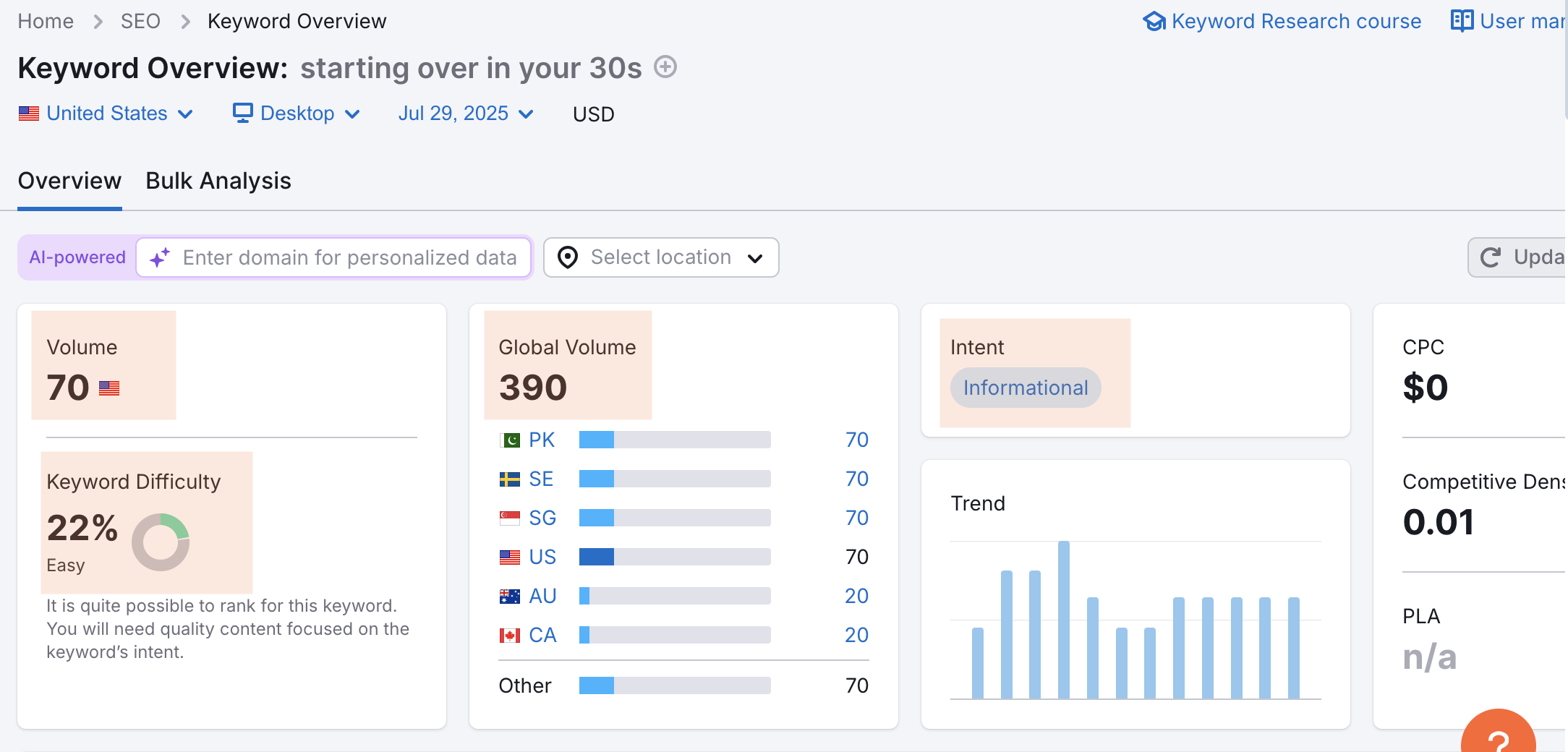
These tools give you a ton of data, but here are the only three metrics I really care about:
Monthly Search Volume: How many people search for a keyword like “how to use SEO on Instagram” every month? If it’s under 100? Not really worth creating content around.
Ranking Difficulty Score: This tells me if a keyword is too difficult to rank for. My rule of thumb? Stick with a ranking difficulty score under 50 (usually shows up as green or yellow). Anything over that is too competitive, which means you’ll never rank.
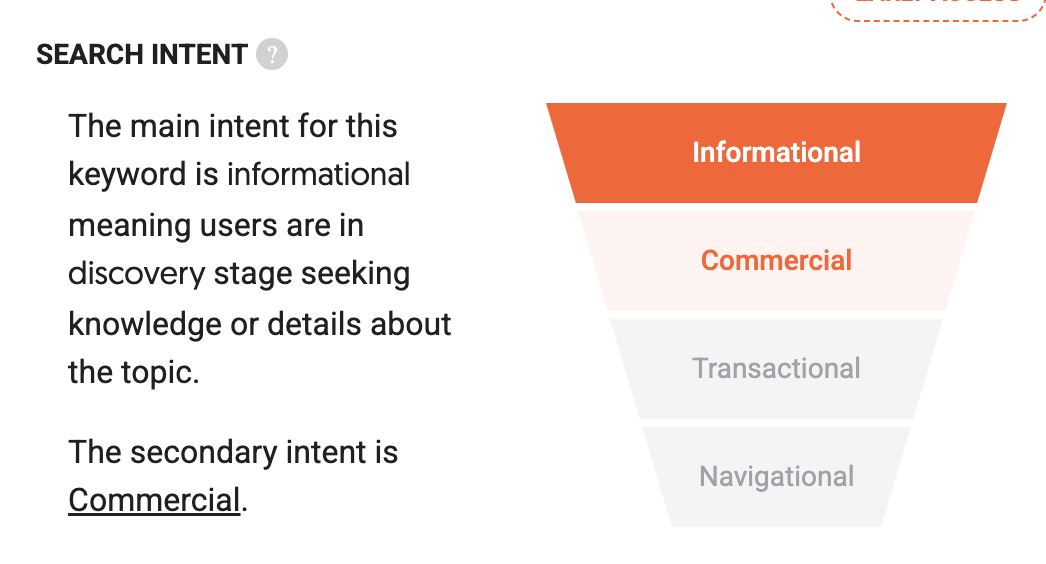
Intent: Is the keyword informational? Then it needs to be a blog or TikTok video. Is it commercial or transactional? Those are going on my money pages, babyyyy.
Here’s what that looks like on:
Ubersuggest

Keysearch

SEMRush
SIDE QUEST: WTF are Keywords? [VIDEO SERIES]
Which keyword tool is the most accurate?
None!
Seriously, anyone who tells you different is a-lyin’ (🦁) to you.
Honestly, it’s hard to gauge because EVERY tool is going to tell you something different. This is also why (and I’m gonna say this is bigger letters and in BOLD because it’s that important):
Pick and keyword research tool and stick with it!
Here’s how different the data from keyword research tools can be:
Don’t do what I’m doing and use 3 at once. It’ll drive you coo-coo for Coco Puffs.
That’s why I’m doing all the madness for you. You’re welcome.
My Grading Scale
I’m kinda picky when it comes to spending my money. Which is why I do a TON of research before making a decision.
Here are 3 things that are non-negotiable for SEO tools:
✅ Is it tied to Google’s API?
An API (Application Programming Interface) is basically how tools legally pull real-time keyword data—like search volume and CPC—straight from Google Ads— so you're not relying on guesswork.
✅ Is it easy to use?
If I need a manual to use your tool, I’m out. I want clean dashboards, clear features, and a near-zero learning curve.
✅ Is it worth the price?
You shouldn’t need a $129/month subscription to get decent SEO data (unless you do it for a living). I want tools that do the job without punching my wallet in the face.
My Top 3 Favorite, Easy, and CHEAP SEO Tools as an SEO Copyriter
Let me be clear first!
There’s not a single SEO tool that will make or break your business. It’s about how quickly it gives you the information and how much you like using it.
So my favorite tool might not be yours.
These are the only SEO tools I’ve tried SO FAR. At the end, I’ll show you the other ones I’ve kinda tried but don’t like, and which ones I’m still gonna test out for ya!
These are in NO particular order!
Actually, that’s a lie.
This is the order from the first SEO keyword research tool I tried to the latest.
UBERSUGGEST
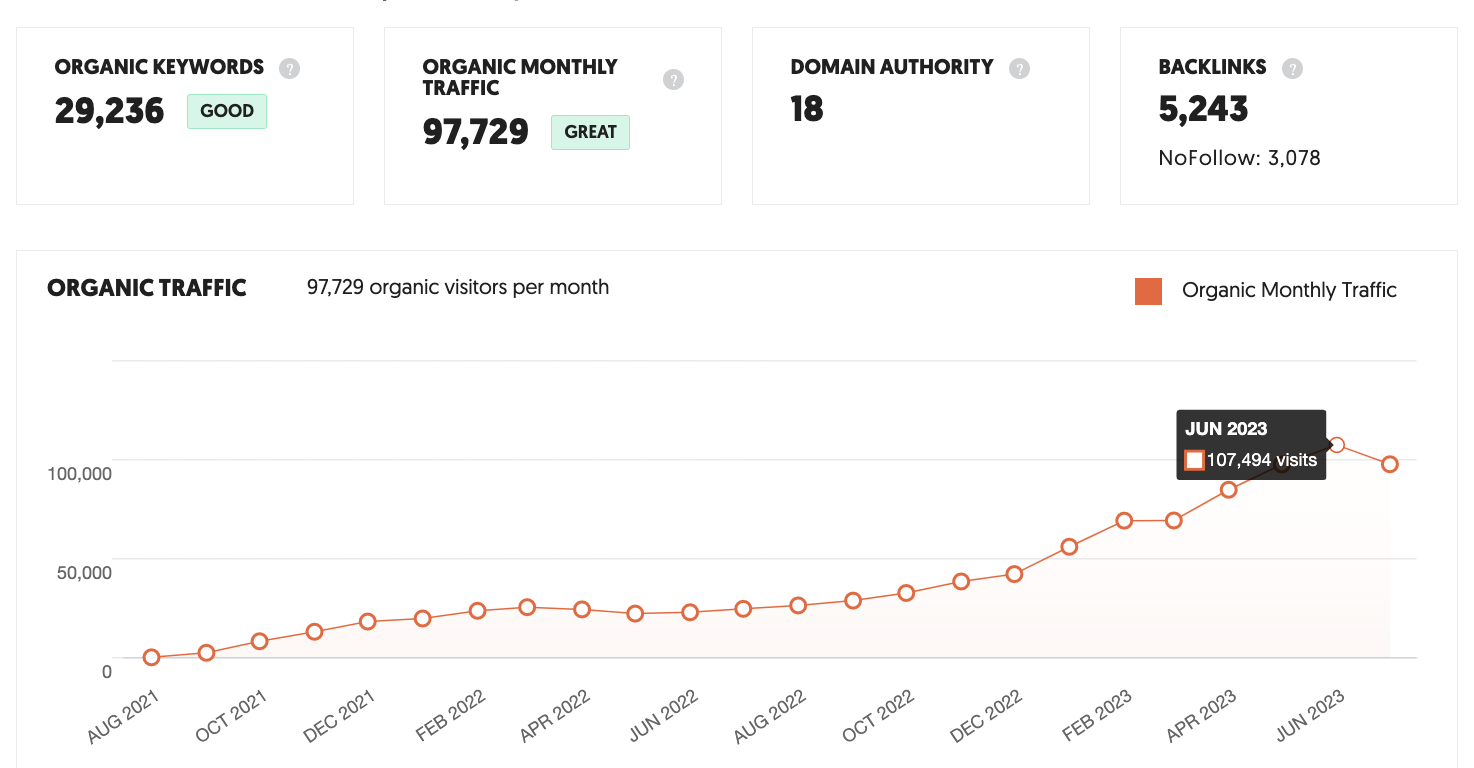
I used to LOVE Ubersuggest. It was the cheapest SEO tool I could find when I first started this SEO biz, and lemme tell you— it works.
This is just one of MANY results I was able to get for my clients just using Ubersuggest.
What I Like:
✅ Price: Only $17 per month.
✅ User Experience: I think Ubersuggest's dashboard is by FAR the "prettiest" and easiest to use. From the Keyword Lists to Traffic Overall, Ubersuggest has the cleanest, user-friendly interface compared to other keyword research tools, in my opinion.
✅ Uses Google’s API: Proof here — Ubersuggest pulls data directly from Google Ads Keyword Planner using the official API.
Email Updates: Every month, Ubersuggest will email me to tell me which keywords have started ranking higher (or have decreased in rankings). Legit, one of my favorite emails to open.
Site Audit: I still use Ubersuggest to do my client’s SEO audits even though I’m also using other tools. It’s just better (or maybe I’m just used to it).
Keyword Ideas: The way this is structured is what made keyword clustering easier for me to understand. It gives you HUNDREDS of variations of the keyword you type in, so you can pick the version that is EASIEST to rank for. It also gives you questions, comparisons, and related keywords, so you don't have to go to Google and copy/paste "People Also Ask" for your blog FAQs.
Traffic Estimation: This is how I spy on my competitors and do analysis for my clients. It's also how I did this series on popular brands’ website SEO. I use this party DAILY.
Answer The Public: People always list this as a separate SEO tool (because it's free), but Ubersuggest actually acquired the platform, and it's included in the platform, making Ubersuggest pretty damn holistic.
What I Don’t Like:
Data: This used to be a PRO, but last year, I noticed the data is WAY off. Every SEO keyword research tool gives you a ranking difficulty score (you want it to be as close to 0 as possible), and EVERY tool now asks you to update it like... once a week. It's every platform (and I can't stand it) but with Ubersuggest, you only get 200 credits to update this data for "free." And considering how heavily I rely on the ranking data and how many keywords I look up— I can get to 200 in a single keyword research session for ONE client. This is what made me start using Keysearch.
Credits: Speaking of data, when I first started using Ubersuggest, EVERY keyword seemed to be in the "green" (i.e., every keyword looked super easy to rank for, which was encouraging!). Now? The ranking difficulty scores all seem to be over 50, even in instances where it doesn't make sense.
AI: I don't use AI to write, but if you do... don't use Ubersuggest's AI Writer.
SIDE QUEST: My Honest Ubersuggest Review after 5 Years [VIDEO- COMING SOON!]
Keysearch
Almost every SEO gal pal and website copywriter I know uses Keysearch as their primary keyword research tool.
My friend Brittany told me she trusts the data for Keysearch over Ubersuggest… while I’ve always been the opposite.
Just goes to show ya that there are different strokes for different folks.
But here’s what I DO like about Keysearch:
✅ Price: Only $17 per month.
✅ Easy to use: For the most part. It could be more intuitive, though.
Data: Keysearch makes it look like it’ll be easy to rank for just about ANY keyword. Which is encouraging when you’re just starting out… even if it’s not accurate. For example, Keysearch tells me “blue light glasses” gets 30K monthly searches and is REALLY easy to rank for with a score of 30/100 (remember, under 50 is where you wanna be). But on Ubersuggest, the ranking difficulty score for this keyword is 81/100.
Deep Dive: You can search up to 50 keywords at once on Keysearch. I like this for when I’m stealing keywords from my competitors (lol), but it’s actually kind of frustrating (more on that in a min).
SEO for Social + Etsy: This was the selling point for me and why I started using Keysearch. While I’ve been able to use Ubersuggest keywords to rank on Google, TikTok, Pinterest, and Etsy, I like that I can at least compare the data on Keysearch (for example, does “SEO tools” get more searches on Pinterest, TikTok, or Google?).
Rank Tracking: With Ubersuggest, you have to personally select which keywords you want to track, and you can only pick 200. Keysearch just straight up tells you eeeeeverything you’re ranking for and where.
Now, to be fair, I’ve been using Keysearch for less than 6 months. And I haven’t used it exclusively, so I haven’t explored every feature yet.
That being said, here’s what I don’t like about Keysearch:
What I don’t like:
❌ Doesn’t Use Google’s API: I couldn’t find any publicly available documentation or a credible source that confirms Keysearch ties directly into Google’s API.
Data: I know I also said I like Keysearch’s data… I just don’t think it’s accurate. There’s no way a keyword that gets 30,000 monthly searches is going to have an SEO/difficulty ranking score of 31 out of 100 (which would be SUPER easy). Plus, anytime I compare keyword data (monthly search volume and ranking difficulty score) between Ubersuggest, Keysearch, and Semrush, Ubersuggest and Semrush’s data are usually pretty similar, while Keysearch’s data is waaaay different.
Keyword Lists: Keyword lists are VERY important to me in a keyword research tool. I save thousands of keywords for me and my clients on these lists, and I need them to be easily accessible (and easy to add to). Keysearch’s keyword lists are kinda frustrating to use and find.
Deep Dive: Like I said, this feature allows you to search data for up to 50 keywords at once… but it’s kinda annoying. If I want to “deep dive” on another client’s keywords, I have to check and delete allllll 50 keywords from my previous deep dive before I can start another one.
Site Audit: I don’t like the dashboard. That’s it.
SIDE QUEST: Keysearch Review: Why I’m Iffy About It [VIDEO- COMING SOON!]
SEMRush
Okay, so SEMRush is the opposite of a cheap SEO tool, but they do have a FREE option which I’ve used for years just to double-check Ubersuggest's data.
Spoiler alert! It’s always different. Once, SemRush told me my client’s monthly traffic was 8K, while Google Search Console and Ubersuggest told me it was 15K.
Uuuggh. Annoying.
But I’ve also had this same experience with Ubersuggest. It said my photographer client was getting 10K visits per month when, in reality (reality = Google Search Console data), it was under 1K.
However, the more I use SEMRush, the more I understand why it’s one of the top recommended SEO tools.
(and why it may be worth paying for).
What I Like:
Accuracy: You’ll see a lot of SEOers use SEMRush or Ahrefs as their like “indicator” if other SEO tools have accurate data. They’ll say something like, “Yeah, I noticed that Ubersuggest’s numbers are WAY off. SEMRush has more accurate data.” But like… they only say that because they’ve been using SEMRush all this time! I could say the same thing about SEMRush as an Ubersuggest fan of 5 years. But I won’t do that because I’m not biased (anymore). Instead, what I WILL say is that SEMRush and Ubersuggest’s data are more similar compared to SEMRush and Keysearch’s data (in other words, Keysearch’s data seems the most off).
Detailed: Duuuuude. The keyword suggestions. The type of keyword. SERPs. Anything and everything you would want to know when you’re thinking, “Is this keyword even worth creating content on?” SEMRush will freakin’ TELL you all in one place.
✅ Dashboard: It's easy to use. It's not as aesthetically pleasing as Ubersuggest, but I’ll take it!
What I Don’t Like:
❌ Price: Over $100/month or $1K+ annually.
❌ Doesn’t Use Google’s API: Proof here — SEMrush uses its own proprietary data sources, not Google’s Keyword Planner API.
❌ Overwhelming: To non-SEOers, all the information might be overwhelming at first. It was overwhelming to me when I first started using it. But like any tool, you’ll get used to it. And you do get what you pay for (in a good way).
You can see that SemRush failed all THREE non-negotiables on my grading scale.
And yet… this year I realized that it’s worth the price.
SIDE QUEST: Is SEMRush Worth the Price? [VIDEO Review- COMING SOON!]
Bonus! Keywords Everywhere
Besides the free versions of the SEO tools above, Keywords Everywhere is going to be your cheapest lying. It’s only $21/year, so I just use it as a lil’ extra SEO helper.
What I Like:
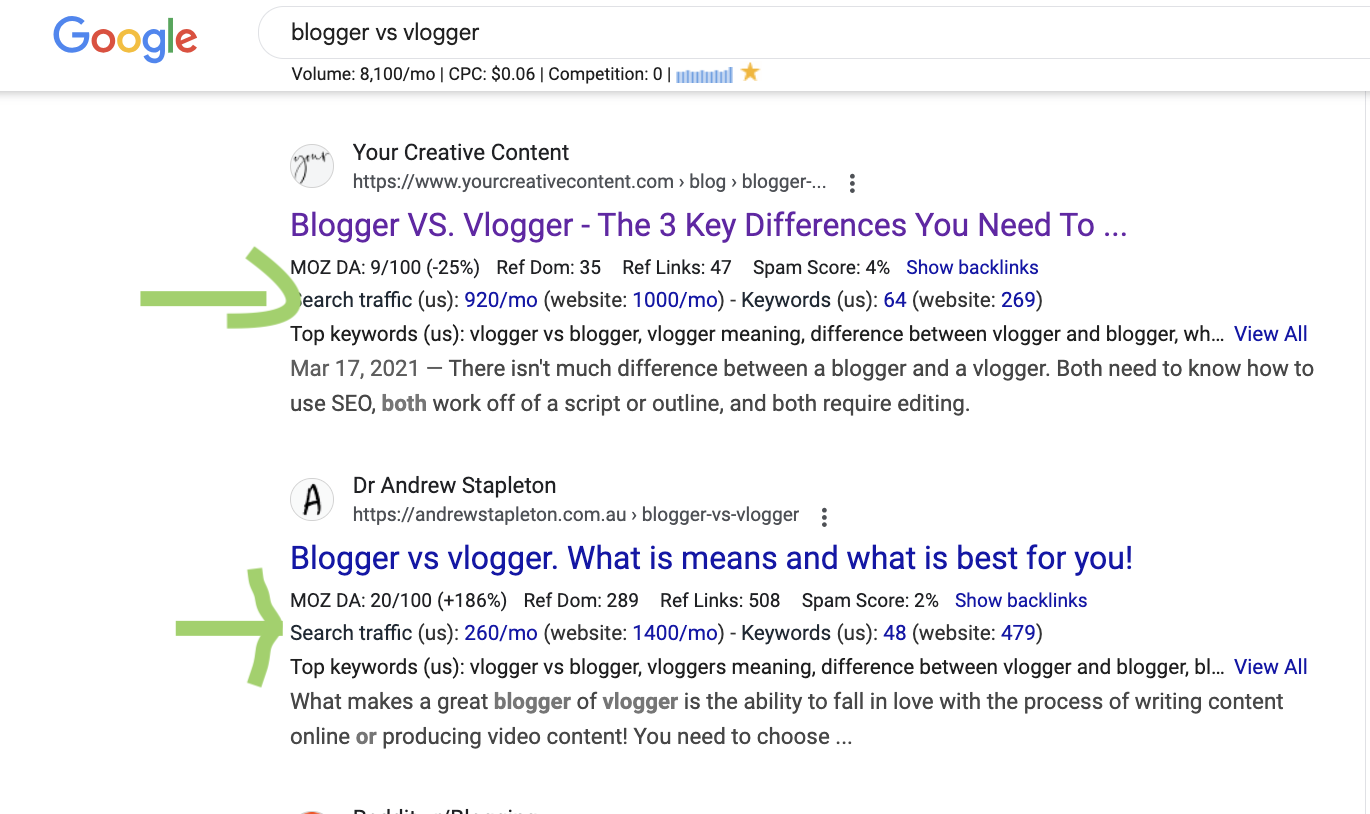
Easy Data: It gives me data right on Google’s search results page (SERP), like how many clicks each link gets.
Instagram Data: You can see the trend, competition, and search volume for Instagram keywords and hashtags. I sometimes use this for Instagram SEO, but I’m wondering if Keywordtools.io might be better?
Widgets/Chrome Extension: KeywordsEverywhere shows up automatically as a little widget (or whatever it’s called… extension?) right on Google and Instagram.
Price: $21/year
What I Don’t Like:
Accuracy: I genuinely don’t know how accurate it is.
Surface Level: You really only get surface level data as far as I know. For example, it’ll tell you the amount of clicks, but not the CPC for ads or the ranking difficulty.
Glitchy: I literally couldn’t pull up the Instagram hashtag data because it was loading for 20 years and I have the patience of a mom watching their pick out candy at a candy store.
SIDE QUEST: Keywords Everywhere Review + How To Use It [VIDEO- COMING SOON]
Free SEO tools you should be using anyway
A keyword research tool, PERIOD: Idc if you’re using the free version of Ubersuggest or Keyword Planner. Using the autofill on TikTok or Google is NOT enough if you want to start ranking your content.
Google Search Console: 1,000% free and 1,000% accurate data for YOUR site.
Google Analytics: Hard AF to set up, but this is the only tool that can tell you which pages drive the most traffic, AND you can set it up to tell you how much money each page is bringing you.
6 cheap SEO tools that I just don’t like
Google Keyword Planner: Blasphemy, I know! But the data here just is NOT specific enough for me. I feel like it’s more catered to PPC (pay-per-click aka ads) than organic search data.
Answer The Public: I genuinely don’t understand why people recommend this so much. Many of the suggestions are keyword phrases that are WAY too hard to rank for or they’re basic bitch questions that AI will answer anyway (e.g., “how much is Ubersuggest?”).
Marmalead: This is an Etsy-specific keyword research tool. I don’t not like it— I’d just rather have an SEO tool like Keysearch or Keywordtool.io that’ll allow me to see keyword data on multiple platforms… not just Etsy.
Helium: Keyword research tool for Amazon… same reason as Marmalead.
WordStream: Holy moly, is this thing slow. I have ADHD and no patience. No thank you.
ChatGPT: Because it’s not a keyword research tool. Seriously, the data they give you is tied to nothing. Quit using it as an SEO tool lol.
Interesting SEO tools I haven’t tried…yet!
Keywordtool.io: This one seems a little sketch to me? Only because they seem to keyword stuff on their own website. But their data is tied into Google’s autocomplete predictions and you can get keyword data for Google, Etsy, Instagram, TikTok, etc. I would consider this a Keysearch alternative (is it better? We don't know yet! Follow me on Tiktok to find out as I review each tool!).
RankIQ: I’ve seen some well-known SEO bloggers do get impressive results with this tool, so I’m curious! But like I said, there’s not a single SEO tool will make or break your business. It’s all about how quickly it gives you the information and how much you like using it.
Ahrefs, Moz, SurferSEO: Only because these are some of the top SEO tools used by my fellow SEO writers.
The Best SEO Tool to Use Based on Your Business
For business owners who offer SEO:
Ubersuggest (to start)
Ahrefs or Semrush
Screaming frog (if you get into tech SEO… which I still don’t)
If you offer SEO, I DON’T recommend:
Keysearch (I just don’t think the data is very accurate)
ONLY using Keywords Everywhere
For bloggers and content creators
Keywords everywhere
RankIQ
I DON’T recommend:
Screaming frog
Ahrefs
Comparison of EVERY SEO Tool on the Market
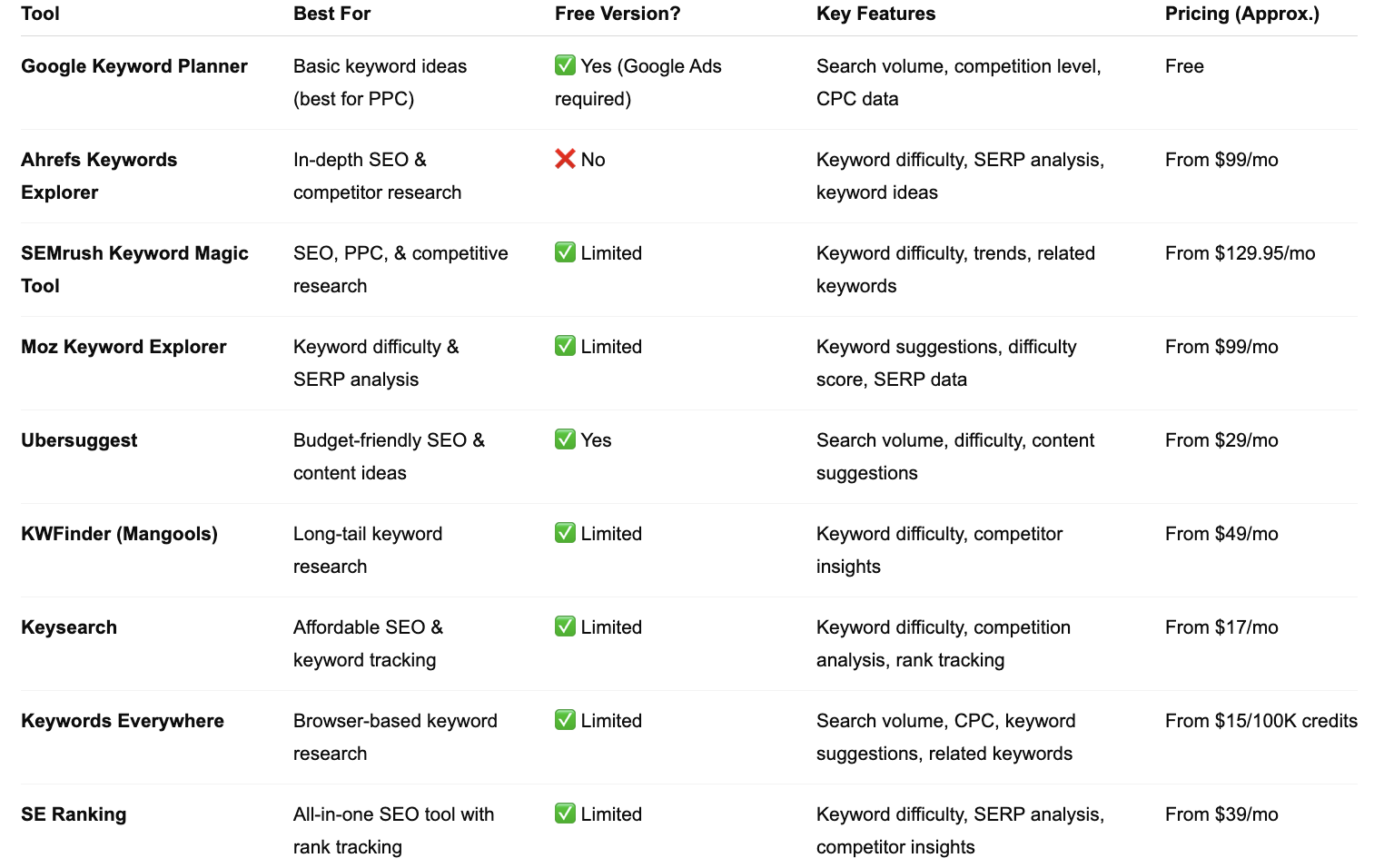
My FULL SEO Tool Reviews
Here are the full reviews for EVERY keyword research tool I’ve tried so far.
Each one also includes a 5-10 minute TikTok walkthrough so you can see all my fav and least fav. features. Fun!
Keysearch Review
SEMRush Review
Ubersuggest Review
10 Free SEO Tools
Google Keyword Planner
Daily Searches: Unlimited
Limitations:
Requires a Google Ads account
Primarily designed for advertisers, so data may be more PPC-focused
2. Ubersuggest
Daily Searches: 3 free searches per day
Limitations:
Limited access to advanced features
Requires a paid subscription for unlimited searches and additional data
3. WordStream Free Keyword Tool
Daily Searches: Unlimited
Limitations:
Requires contact information to access full results
Data may be limited compared to paid tools
4. KWFinder (Mangools)
Daily Searches: 5 free searches per 24 hours
Limitations:
Limited to 50 keyword suggestions per search in the free version
Access to advanced features requires a paid subscription
5. Keyword Surfer
Daily Searches: Unlimited
Limitations:
Provides basic data directly in Google search results
Lacks advanced keyword difficulty metrics
6. SearchVolume.io
Daily Searches: Unlimited
Limitations:
Provides search volume data only
Lacks additional metrics like keyword difficulty or competition
7. SEMrush
Daily Searches: Up to 10 Analytics reports per day.
Limitations:
Access to advanced features and in-depth data requires a paid subscription.
Free users may experience restrictions on the amount of data displayed per report.
8. Ahrefs
Daily Searches: Limited access through free tools like the Keyword Generator, which provides up to 100 keyword ideas per query.
Limitations:
Free tools offer basic data; comprehensive features like Keyword Explorer and Site Explorer require a paid subscription.
Free users cannot access detailed metrics such as search volume and keyword difficulty beyond the initial suggestions.
9. Keysearch
Daily Searches: Offers a free trial with limited daily searches; specific limits are not publicly disclosed.
Limitations:
Free trial provides restricted access to features and data.
Full functionality requires a paid subscription.
10. KeywordTool.io
Daily Searches: Allows free searches with limited results per query.
Limitations:
Free version provides keyword suggestions without detailed metrics like search volume, competition, or CPC.
Access to comprehensive data and additional features requires a paid subscription.
My recommendation as of 2025
Free:
On a budget:
If you want SEO to be your main traffic driver because SCREW posting on social media every day: