
How To SEO the Shit Out of Your Blog

Learning how to SEO your blog probably seems daunting, but I promise it’s easier than it sounds!
Part of the reason writing blogs for your website is so important is because they have SEO capabilities. Those who use SEO don’t have to worry about social media algorithms. We’re not waiting to get lucky and to go viral in order to build our audiences.
With SEO, you get to create your own luck.
By writing blogs consistently, you give Google the chance to pick up on your website more and more. When that happens, you can get more readers, more clients, and ultimately, build your business.
What Is SEO, Anyway?
SEO stands for Search Engine Optimization. The search engine (if it's not already clear) is the area where you start your average web search: Google, Firefox, Safari, etc.
Each engine offers a search bar where you type in… whatever it is you're trying to look up.
The words you type in are the "keywords.” SEO specialists like myself do keyword research to strategically pinpoint which ones to add to blog posts. This "optimizes" the blogs for search engine results and gets your blog on Google’s front page.
It’s kind of like using hashtags on Instagram except way more straightforward and waaaay more reliable.
You want your blog to show up on Google's front page because nobody looks past the first page for their search inquiries. In fact, according to Hubspot, “75% of people will never scroll past the first page on a Google search.”
So essentially, without SEO, your blog will be invisible.

Take this blog for example. My keyword for the blog you’re reading now is "how to SEO". Now take a look at Google's search engine results when I type in these keywords.

There are about 10 articles on Google's front page for this topic and 745 million results. Needless to say, the odds of winning the front page "lottery" are not in my favor here.
Or so it seems.
RELATED: SEO Writing Tips For Bloggers and Business Owners
Understanding SEO Rankings
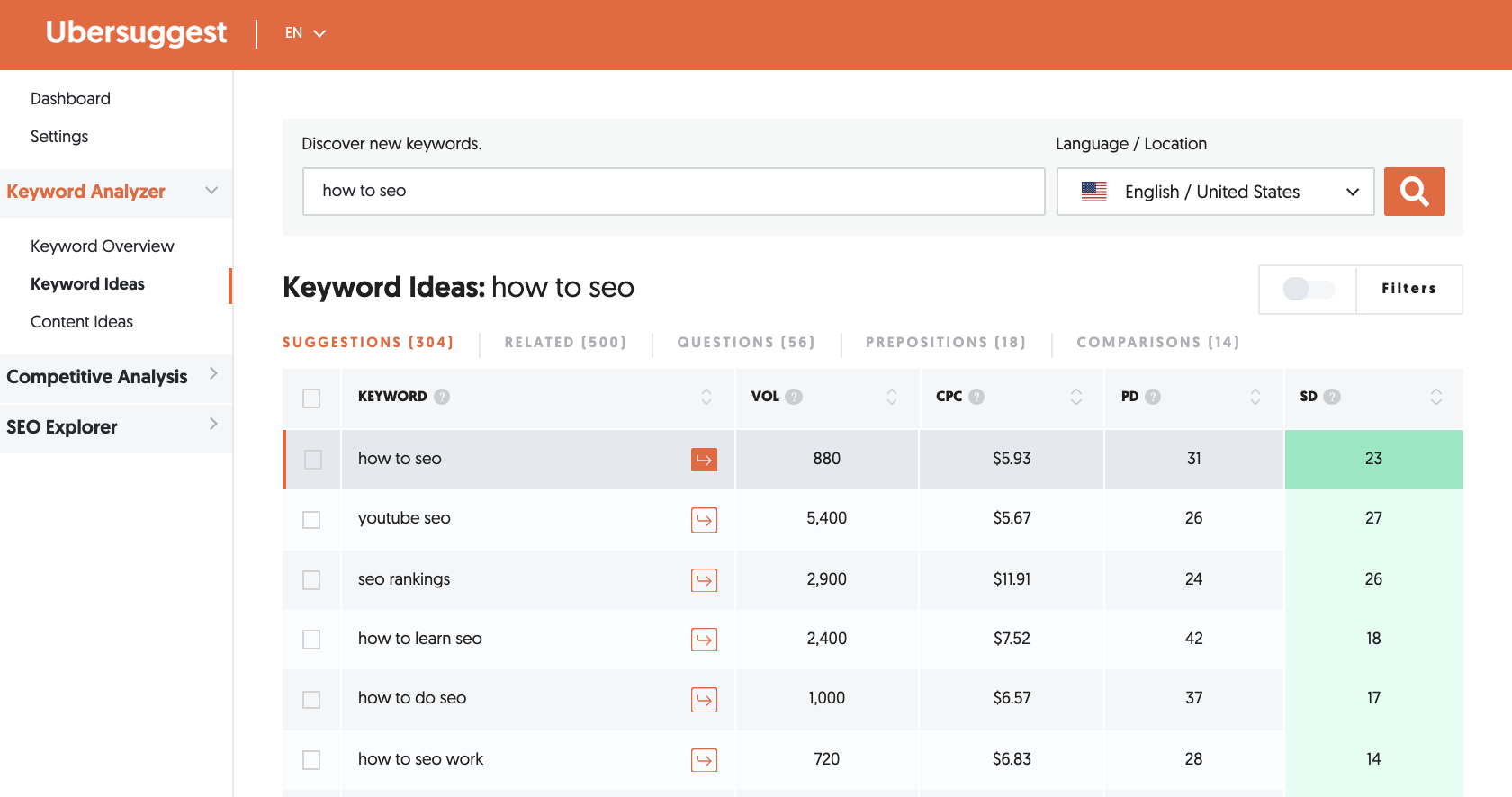
SEO tools like Ubersuggest can tell you the exact monthly search volume for each keyword you have in mind. Not only that, but it can give you a ranking score of how difficult it is to get on Google’s front page.
This blog’s keyword has 880 monthly search results with an easy ranking score of 23. So it’s actually a great keyword to use to grow my blog because I’ll probs end up on the front page (is that how you found me?).
That’s why it’s important to do SEO keyword research first. Not outlining your blogs, not creating a blog content calendar… keyword research.
But more on that in a sec.
How To SEO Optimize
Let’s say you completely understand SEO. You even have a library of potential keywords to use with your blogs.
Now what?
If you have WordPress, you have the luxury of downloading plug-ins like Yoast for a kind of fill-in-the-blank SEO instruction. Yoast essentially tells you whether or not your blog is SEO-friendly with a red, orange, or green light. Red means your blog has virtually no chance of showing up in search results, and green gives you better odds.
It's free software but not inherently the best resource to learn about SEO. You still need to implement internal and external hyperlinks, content pillars, get backlinks, and social media marketing, along with a few other factors that determine your SEO ranking.
If you’re using Shopify, Squarespace, or any other CMS that doesn’t have a fill-in-the-blank SEO app, don’t worry— that’s what this blog is for!
RELATED: SEO Tips and Tricks You Almost ALWAYS Forget About
How To SEO Your Blog
Why is it so important to write blogs with SEO? Well…
SEO gets your blog on Google’s front page, which means growing your audience;
Getting on the front page shows you’re an expert in your niche, making you a trustworthy source to the public;
Blogs can act as a lead generation tool that directly targets your ideal client, reader, or customer;
A million other reasons I won’t list here.
For those who don’t have SEO plug-in options, you’re going to follow my fill-in-the-blank SEO blog template!
But before you start getting cozy with Yoast (or join my membership group!), let me walk you through the exact steps you need to take each time you want to write a blog with SEO.
Step 1: Pick a Keyword
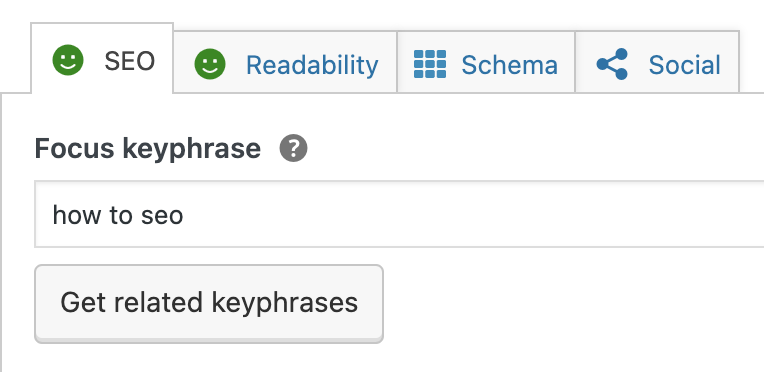
WordPress Yoast SEO
Picking a keyword is crucial. It's the word or phrase you decide that most people will search for based on your topic. You can use long-form keywords or short-form keywords, but the choice is up to you.
Step 2: Find Alternative Keywords
Alternative SEO keywords are basically just synonyms for your main keyword. These are the building blocks that make up the foundation of each blog. You’ll use these extra keywords or phrases to climb the SEO ladder to rank for more than one keyword per blog.
You don’t have to use these, but they’ll help build blog authority and SEO ranking. I personally use related keywords found in Ubersuggest or FAQs. I try to include the 1-2 times in each 500-word blog, and I might use them as an H2 heading if it’s an FAQ.
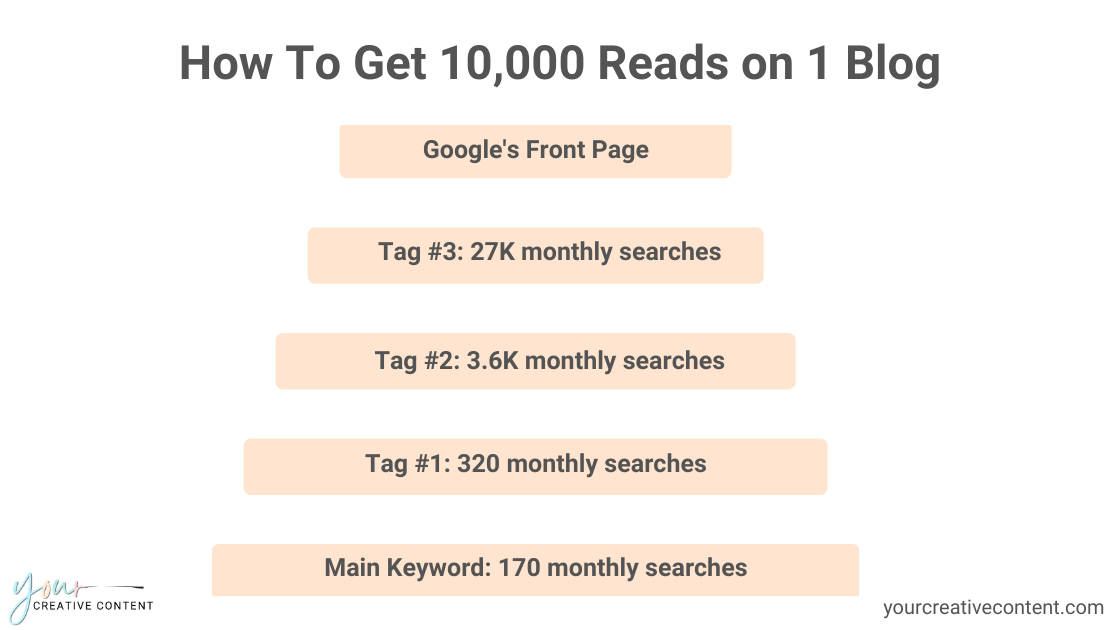
“Tags” in this image are referring to Alternative Keywords. Just pretend it says that ;)
PRO-TIP: You can find FAQs by typing your SEO keyword in Google. Look for Related Searches at the bottom. Platforms like Ask the Public or Google Trends, can also help you find relevant things to include in each blog.
The cool thing about your Alternate Keywords is that they can help you get a ton of reads from a single blog post. I call this “Keyword Mapping.”
How To SEO For Maximum Potential
For example, using Ubersuggest, I can see that the keyword “how to make sourdough bread” has 27,000 monthly searches. As a new food blogger, I probably won’t show up on Google’s front page for that keyword (yet) because there’s too much competition.
Plus, I haven’t established my expertise/authority. The more blogs you write, the more authority you’ll have. The more authority you have, the more you’ll start to see traffic from those higher SEO rankings.
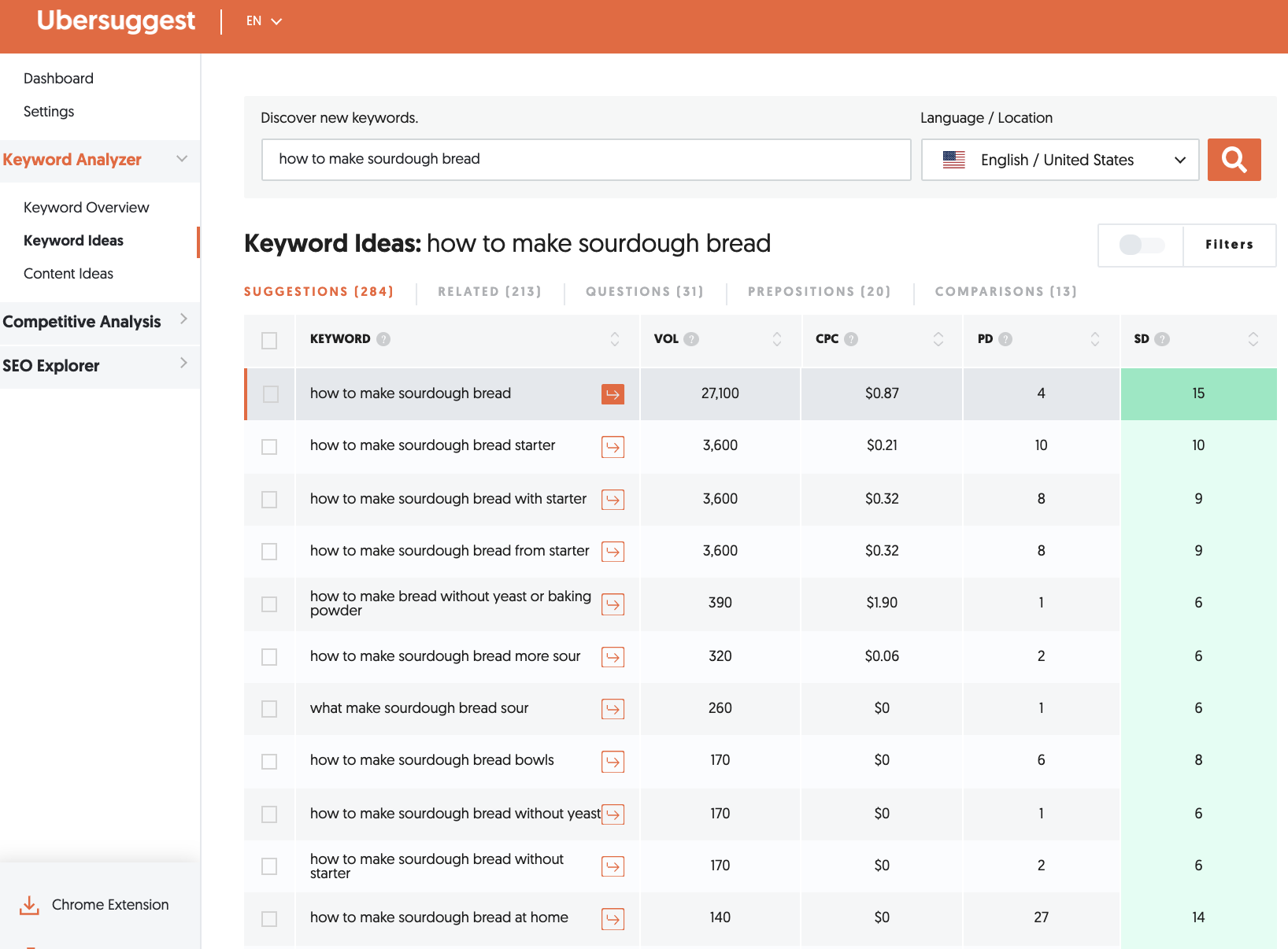
If I want to make sure that my sourdough bread recipe eventually appears at the top of virtually any search result for this topic, then I would include the alternative keyword suggestions that Ubersuggest gives me. This includes:
Alt Keyword #1: how to make sourdough bread at home (140 monthly searches)
Alt Keyword #2: how to make sourdough bread more sour (320 monthly searches)
Alt Keyword #3: how to make sourdough bread starter (3.6K monthly searches)
As a new blogger, I can expect my blog to appear in the lower search results first. As long as I include the lower-hanging keyword “how to make sourdough bread at home” a few times in my blog, then I have the opportunity to get up to 140 EXTRA reads on that blog every month.
You can use this organically in the body of your blog or create sections for each Alt Keyword (and put them behind your images— I’ll explain that next).
A few months down the line (after you start building up your blog library), that blog on how to make sourdough bread might start showing up under the higher search rankings like “how to make sourdough bread more sour “ or “how to make sourdough bread starter.”
The goal would eventually be to get this blog to rank for your main keyword “how to make sourdough bread” with those 27K monthly searches and your keyword tags. The top search result for that keyword gets over 8,000 reads every month. Combined with the reads from the tags, this blog is probs gettin’ at least 10K reads a month.
From one blog.
Step 3: Write Your Titles
When you pick a title, it should be catchy. Many publications resort to "clickbait" titles which essentially means the title acts as the "hook" and doesn't really reveal the information the title suggests. It's best to stay away from those, or you’re going to aggravate your audience.
My blog title here is ".How-To SEO the Shit Out of Your Blog”. Notice that my keyword is at the very front of my title.
Your Blog Title and your SEO title should be different. So allow me to explain.
RELATED: These Terrible Tips for SEO Will Hurt Your Blogs
Step 4: Hit the Snippets
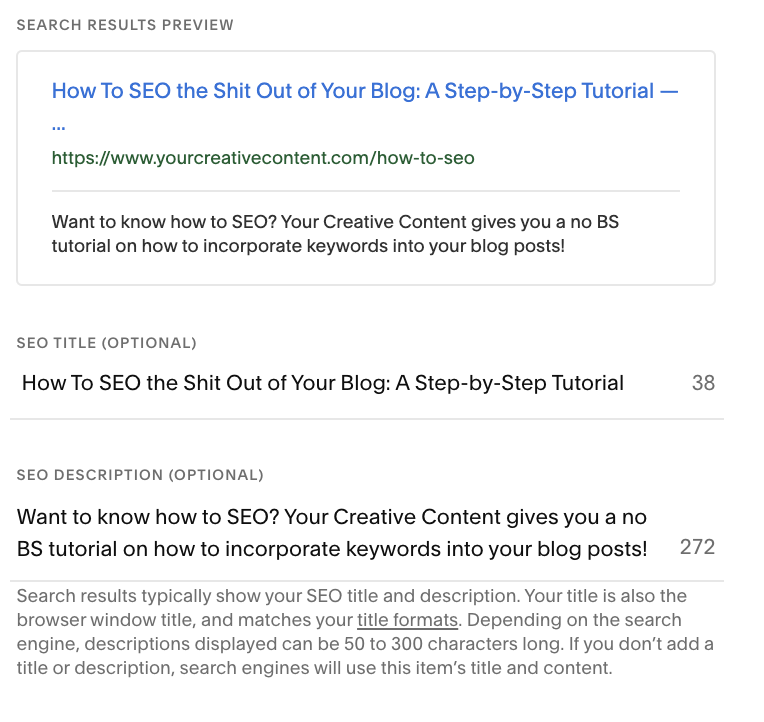
The “snippets” will be your SEO Title, SEO/Meta description, and the URL or slug. This is what will show up on Google's front page.
Squarespace SEO
My SEO Title for this blog is “How To SEO the Shit Out of Your Blog: A Step-by-Step Tutorial.” Again, the SEO keyword is at the front… the rest just gives it a little personality so people will click on my blog (and not someone else’s).
The meta description should contain your keyword and a call-to-action. It’s essentially a summary or clue as to what your blog is about (so make it interesting!). This is the small “snippet” that shows up on Google under your SEO Title.
I usually just make the URL/slug my main SEO keyword. For example, you can see in the search bar right meow that this blog’s slug is /how-to-seo.
You can also use the title as your slug if you want to get a lil’ bit fancy. alternatively, this blog’s URL could be yourcreativecontent.com/blog/how-to-seo-the-shit-out-of-your-blogs.
The main takeaway here is that your keyword appears in each part of these snippets. On Squarespace, go to your blog > Settings > SEO to change this section.
Step 5: Outlining, baby!
This may seem like a lot, but I’m teaching you how to do SEO one baby step at a time.
If you don’t have an SEO plugin like Yoast, use your new free SEO blog template as a staple template to outline all of your blogs from here on out. Working with an outline is going to make your blog flow seamlessly and make implementing SEO supa simple.
After you fill in your SEO necessities (see below), you’ll need to figure out the key points of your blog. These will be formatted as your H2, H3, or H4 subheadings. These might be your alternative keywords, step-by-step instructions (like how this blog is formatted), or a listicle format.
RELATED: Debunking the Myths of Being a Blogger
Step 6: Start Writing
If you can outline 4 blogs right off the bat, then you're primed for batch blogging success! Now, it's time to start writing.
Make sure to include your main SEO keyword at the very beginning of your blog. If you look back, you'll see that I include my keyword within the first sentence. Sometimes you can get away with just using your keyword in the first paragraph, while other software recommends that you use it right away.
Here are some general rules of thumb for when and where to include your keyword:
In the first sentence
In one or two H2 headings
At least 3 times per 500-words
Space them out; don’t use your keyword more than once per paragraph.
Once you have the first draft, make sure you’ve done all you can to include your keywords without keyword stuffing your blog.
Then, go back through and find where you can organically use internal links (aka links to your older blogs) and external links (aka links to blogs other than your own). These both raise your SEO score. Make sure you use at least 1 external link and 3 internal links.
Step 7: SEO Your Images
You wouldn’t believe how drastically my blog reach changed once I started using my keyword in my blog’s images. Whether you are using images from Canva or you’re using your own photos, you want to save your images onto your computer as your SEO keyword.
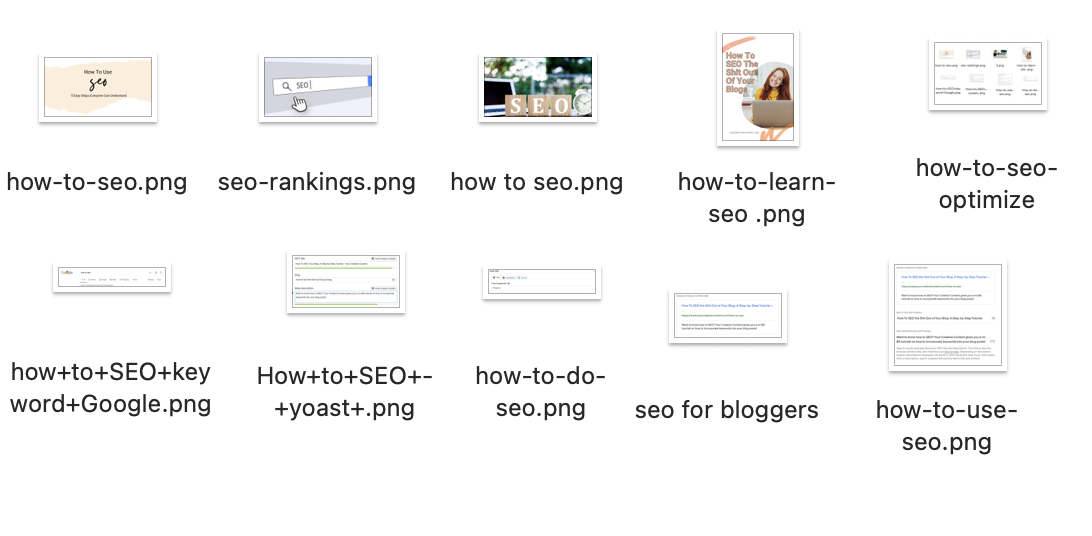
The reason you want to include your SEO keyword in your images is because it gives you even more opportunities to appear on Google’s front page. So even if your blog doesn’t appear in the front page link results, your blog’s image might appear on the front page under Google Images.
Side note: If you have WordPress, you will also have the option to fill in an image description or Alt Text. Use your SEO keyword or extra keywords in these areas.
RELATED: Advanced SEO Tips for Bloggers
Final Thoughts
So that's the general gist of SEOing your blogs. If it sounds like a lot of work, it's because it is.
At first.
It took writing about 10 blogs with SEO for me to get the hang of it. Now I can write my 1K-word blogs in under an hour with full search capabilities. Now my target audience finds me.
Also, remember that the number of times your blog is read plays a factor in landing on Google’s Front Page.
Which means — you guessed it — you have to actually share your blog.
Phew, that was a lot. If you want a sneak peek at how I make blogging easy, fast, and profitable, grab those free SEO blog templates!

Pin it!